

Streamlined, Professional Lawn Forms
Create, send and track custom, signable digital forms directly through RealGreen’s CRM – proposals, contracts, checklists and more, all without a third-party app.
Send digital estimates and collect signatures SEAMLESSLY WITH REALGREEN FORMS! REALGREEN FORMS: Upload custom forms Easily set up the form to collect information from RealGreen. Dynamic fields pull in data such as customer information, services and work orders. Send estimates, proposals to customers any time! Easily track customer signatures. It’s as easy as: 1 UPLOAD, 2 SEND, 3 TRACK. UNLOCK EASY ESTIMATES, PROPOSALS AND MORE WITH REALGREEN FORMS! Schedule a demo today.
Top Lawn Forms Management Features

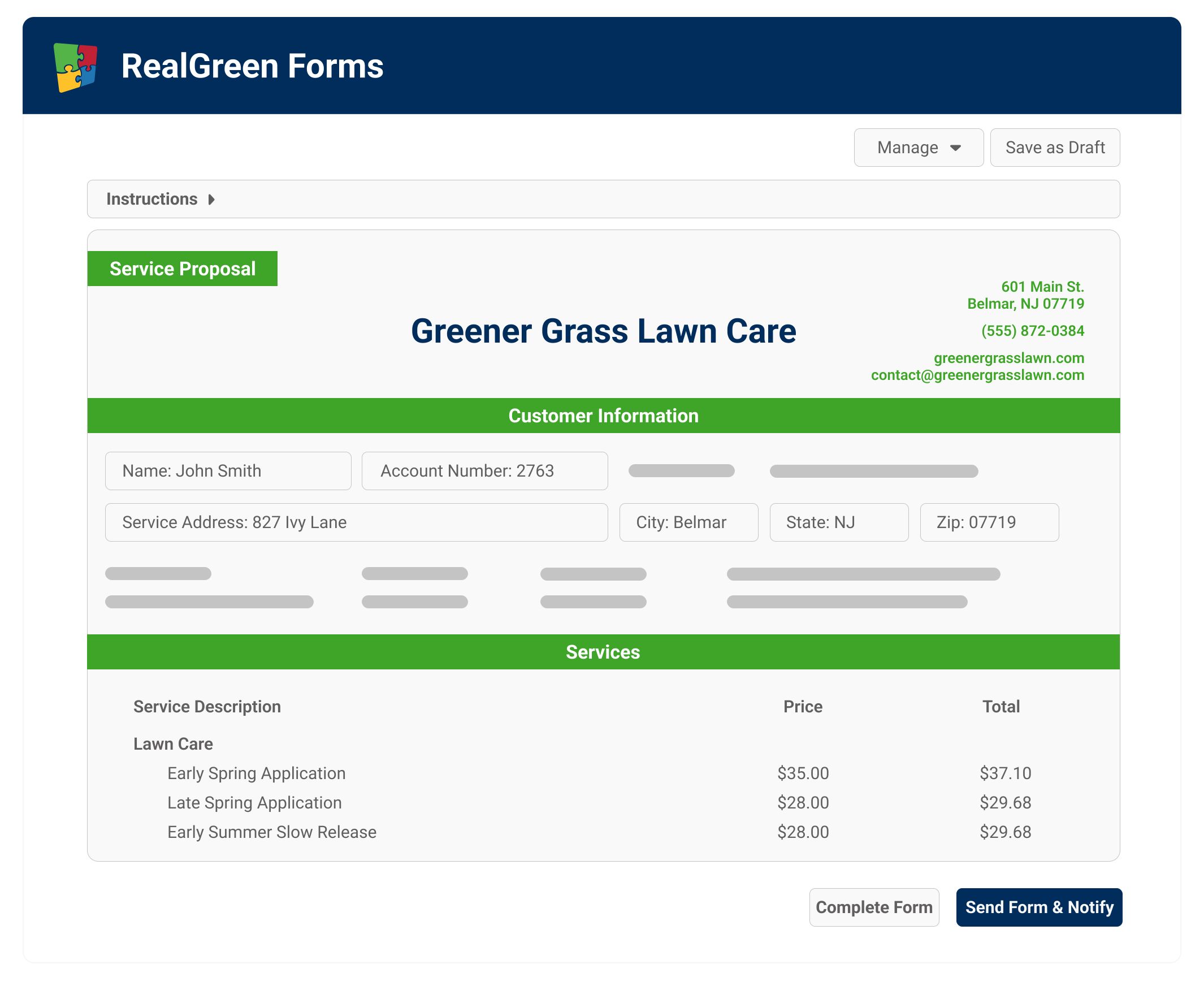
Professional-Looking Proposals and Contracts
- Send company-specific templates for consistent, branded, professional documents
- Forms auto-fill with account and company information for ease of completion
- Include different levels of service, materials and price points offered by different locations or branches
- Send for signature quickly from within RealGreen


Eliminate Paperwork with Digitized Forms
- Streamline your workflow with drag-and-drop form import
- Fields can be configured for automatic pre-population, minimizing manual data entry
- Customize your forms with calculations, image zones and other designated areas
- Manage all forms effortlessly through a centralized dashboard


Save Time With Streamlined Processes
- Efficiently finalize deals by instantly completing, printing and emailing proposals and forms
- Conveniently accessible via web or mobile for on-site completion
- Seamless integration with RealGreen – no clunky third-party apps necessary

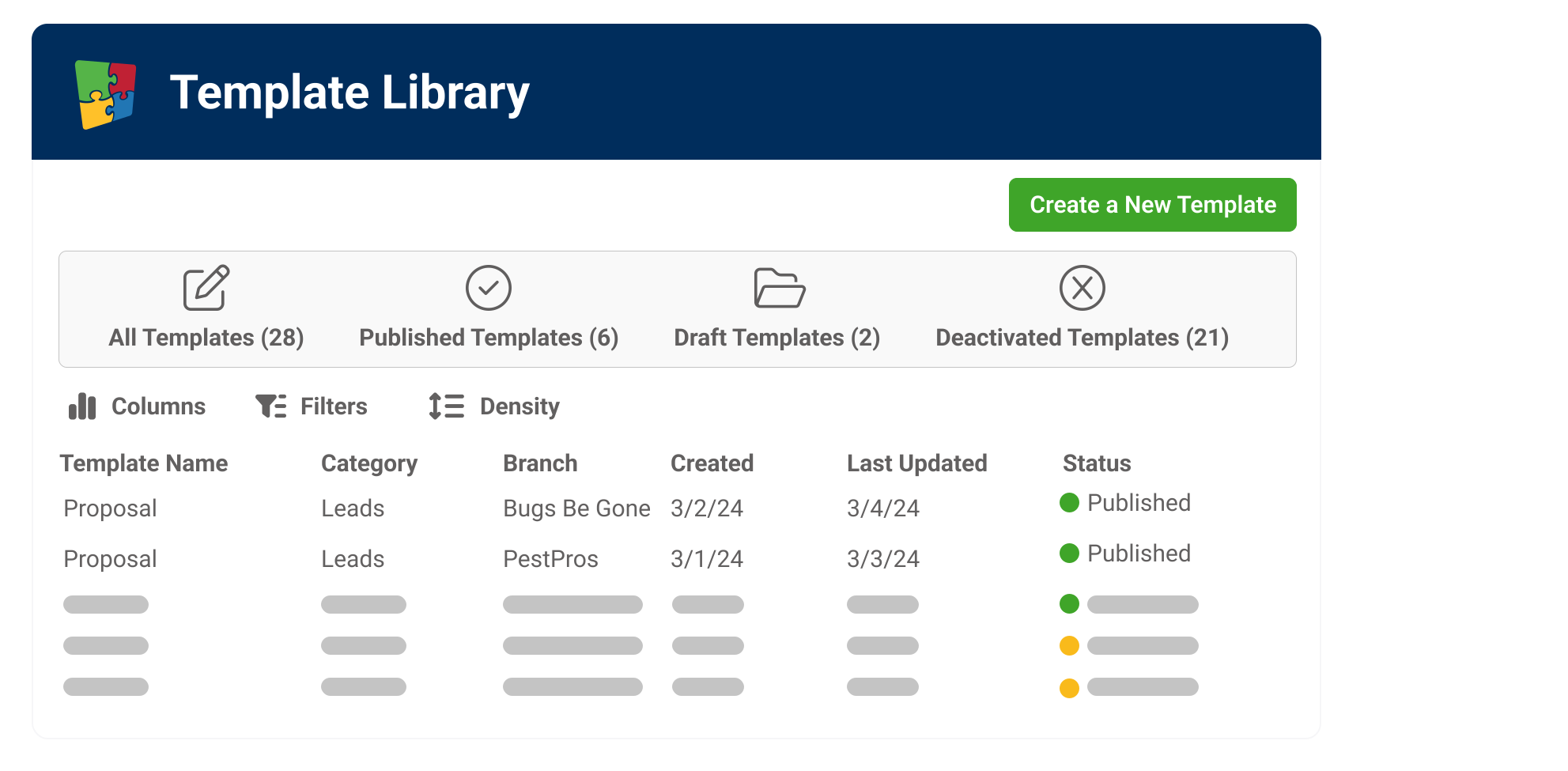
Track and Manage Forms
- Access, filter and organize all forms from one centralized hub.
- Monitor lawn forms and their statuses based on date, associated orders, branch, location, and template
- Easily resend, revise, and download forms, all within the tracker built-in to RealGreen’s CRM
A Trusted Solution
"You’d need to purchase four or five different systems to get the same experience as RealGreen. This software gets it done much easier than others where you have to jump around."
Andrew Burkey, Director of Call Center Operations, Experigreen
"The way we can communicate with our customers gives us versatility that competitors don’t have: If customers prefer to receive an email or text message, two days prior to service or the day of, we have all of those abilities built-in within the system."
Richard DeWolf, Director of Business Solutions, Senske Services

"I love that RealGreen was built by someone who had their own lawn care company, so they understand the needs. They cover the whole gamut: customer communication, customer service, sales, operations, inventory. They're an excellent partner."
Grace DiBenedetto, GM, Grass Master Plus

"I was using some cheaper software before finding RealGreen and thinking, 'Okay, this is the real deal.' I've looked at other options, but none of them do everything as well."
Alec McClennan, Founder, Good Nature Organic Lawn Care
Top Customers








Built to Scale With Your Green Industry Business
RealGreen’s all-inclusive platform provides everything you need to run and grow your business in one place — but we’re far from one-size-fits-all. We offer the most flexible, customizable and robust green industry software. Designed to fit your needs, we offer a range of packages and pricing options, both usage and user-based. Contact us today to get a custom quote for your business.
Small Business
Manage your lawn business all in one place, from any desktop or mobile device.
Ideal for 3 crews or more
KEY FEATURES

Full CRM
Online Measuring
Scheduling & Work Orders
Dynamic Routing
Mobile App
Customer Notifications
Customer Portal
Email Marketing
Digital Marketing
Integrated Payments
Sales Chatbot
Professional
Designed to give your business what it needs to grow faster than the competition.
KEY FEATURES
Full CRM
Online Measuring
Scheduling & Work Orders
Dynamic Routing
Mobile App
Customer Notifications
Customer Portal
Email Marketing
Digital Marketing
Integrated Payments
Pay Over Time Solutions
Capital Solutions
Advanced Reporting
API Integration
Enterprise
Unlimited licenses to expand your business and maximize your money.
KEY FEATURES
Full CRM
Online Measuring
Scheduling & Work Orders
Dynamic Routing
Mobile App
Customer Notifications
Customer Portal
Email Marketing
Digital Marketing
Integrated Payments
Pay Over Time Solutions
Capital Solutions
Advanced Reporting
Advanced API Integration
Advanced Analytics Integrations
Professional Services

FAQ
Take your existing form, create a fillable PDF version, then upload it into RealGreen's Custom Forms Manager. From there, you map fields to customer record data — name, address, service details, pricing — so they auto-populate when you generate a form for a specific customer. The implementation team walks you through the mapping process.
Yes. Customers can sign documents digitally from any device, at any time. Form Tracker in SA5 lets you monitor every document from draft to completed status — so nothing falls through the cracks.
Forms use advanced data mapping to pull customer-specific information directly from your SA5 database — name, address, service details, and pricing are pre-filled automatically, saving time and reducing entry errors.
Yes. RealGreen Forms is built into Service Assistant® so you can create, send, sign, and track professional documents without leaving the platform or paying for a separate e-signature service like DocuSign.
Forms can be emailed to customers for digital signature and completed on the mobile app with in-person signature capture. PDF attachments can be sent via SMS through Communication Center, but digital signing requires either the app or email — customers cannot sign via text message.
RealGreen Forms is a built-in digital forms and e-signature tool inside Service Assistant®. You can upload custom documents, assign them to categories like proposals or contracts, and attach fields that pull customer, service, and work order data automatically. Customers and staff sign digitally from any device, with every form tracked in Form Tracker.
Ready to Grow?
Interested in learning how to grow your lawn business and better serve your customers? Check out our resources!